Your patient writes on WhatsApp. The appointment lands in your calendar.
An AI booking system for private clinics. The assistant talks to the patient in their own language, reads free slots from your calendar, books the appointment and sends the reminder. Straight out of surgery, you talk and your note is written.
- Free beta, no credit card
- Patient identity never reaches the AI
- Nothing to install, runs in the browser
- Each clinic's data is isolated
The path of one appointment, end to end
From the patient's first message to the PDF of the note, here is what the system does, step by step. The lines on the right are the technical detail.
- 01
The patient writes to the clinic's number
The message arrives on WhatsApp. The assistant understands the patient's language and matches the number to an existing patient record; if the number is new it asks for a name and opens the record. Nobody has to pick up the phone.
Meta WhatsApp Cloud API or a Badex line · chat open 24/7 · number matched on the last ten digits
- 02
The assistant reads the calendar instead of guessing
While asking for doctor, service and day, it reads your weekly working hours, your closed days and the slots already taken. It offers nothing on a surgery day you closed, and never invents a free slot.
Free slots = working window − closed range − existing appointments · default interval 15 minutes
- 03
The appointment is written straight into the calendar
When the patient picks a time, the appointment is created through exactly the same path you use in the panel. It shows on the calendar with a WhatsApp mark; services that require a deposit open as deposit-pending and expire on their own if unpaid.
Conflicts blocked by a database lock on the server · two channels cannot take the same slot · written to the audit log
- 04
The reminder goes out, freed slots get used
One reminder message goes out the day before the appointment; no repetition. If the patient cancels, the freed slot is offered automatically to the next patient on the waitlist.
Reminder between 17:00 and 20:00 clinic time · not sent for same-day or late-evening bookings
- 05
The consultation, then the note by voice
When the patient arrives, their card already shows past appointments, notes and any previous surgery. Leaving theatre or the consulting room, you speak into the phone; the recording is transcribed, filled into your specialty's template, and uncertain fields are flagged. You approve it.
An approved note is locked (SHA-256) and a PDF is produced · additions go in as addenda · patient identity never reaches the AI
The clinic's four jobs, inside one system
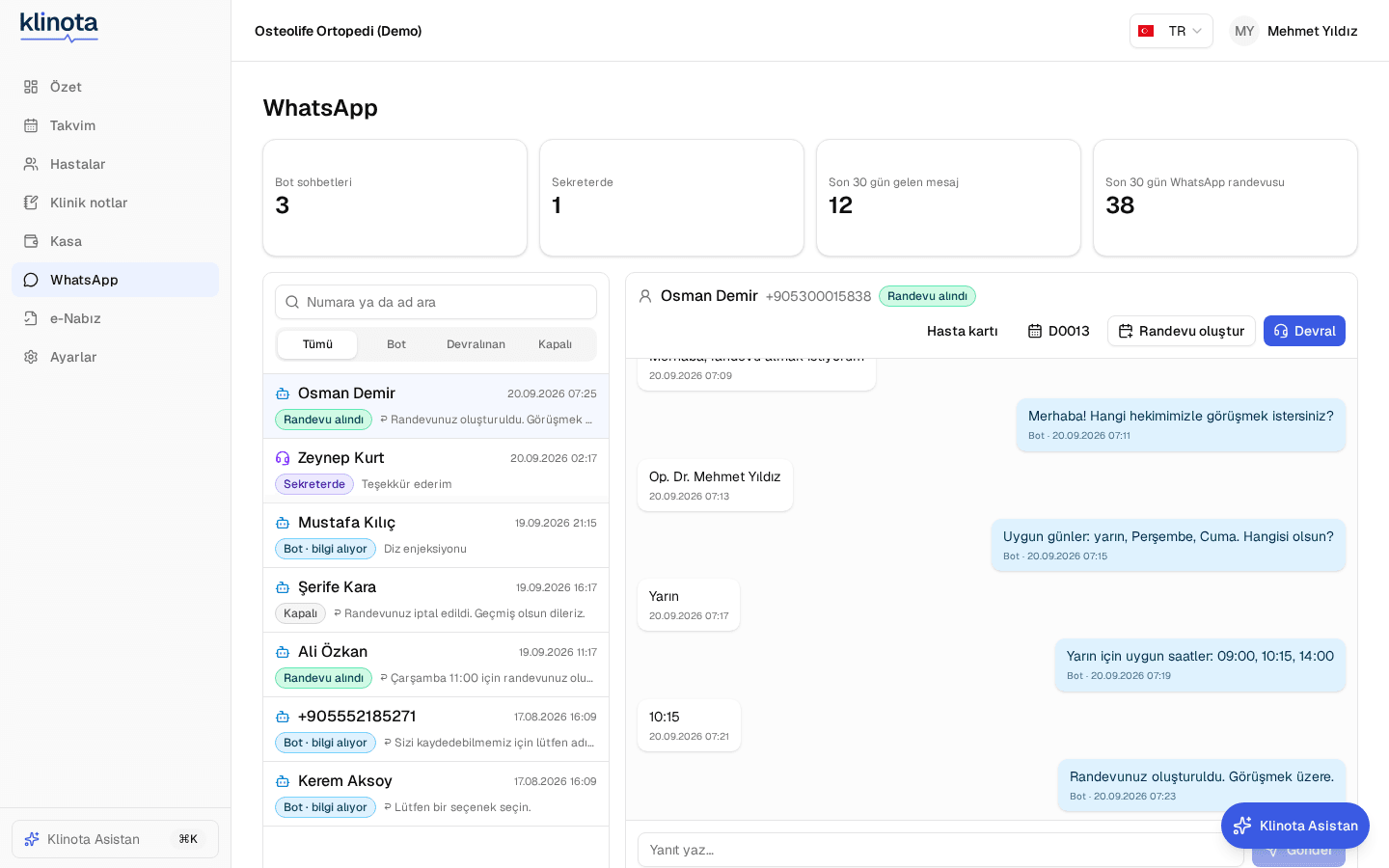
An AI assistant on WhatsApp
The patient writes to the clinic's number. The assistant asks for doctor, day and time, checks your working hours and closed days, and books a conflict-free appointment straight into the calendar. Cancellations and “my appointments” run in the same chat.
- Works at midnight too; nobody has to pick up the phone
- Working hours, surgery days and busy slots bind the assistant
- Sends the reminder the day before on your behalf
- Staff take over in one click and hand back when done
A calendar that matches how the clinic runs
Day, week and month views, with a column per doctor. Appointments sit on a 15-minute grid, move by dragging, and conflicts are blocked on the server. Close a surgery day and the assistant stops offering slots that day.
- 15-minute interval, changeable per clinic
- Appointments from WhatsApp are marked
- Deposit-pending bookings in their own colour
- On cancellation the slot is offered to the waitlist

Operative and consultation notes — by voice
Describe it as you leave theatre. The recording is transcribed and filled into your specialty's template: procedure, side, implants, complication, post-op plan. Anything the AI is unsure of is flagged in amber; you approve it.
- Uncertain fields are flagged, nothing is saved blindly
- On approval the note locks and the PDF is produced; additions are addenda
- Patient name and ID never reach the AI
- Recordings are deleted after the period your clinic sets

On the phone, one tap after surgery
Add it to the home screen on iPhone or Android; no store download. Tap the microphone in the bottom bar, pick the patient, speak. While you talk, the patient's previous surgeries, implants and medications stay beside you.
- Pick the patient, record, the note is ready
- Patient history panel: previous surgeries, implants, next appointment
- Calendar, patients and WhatsApp in your pocket

The whole panel, in six languages
The six images below are different screens of the panel, each in a different language. Everything is translated, from the menu and date formats to status labels and the PDF; Arabic runs right to left. Whatever language your patient writes in, the assistant answers in it.


Screenshots are from the demo clinic and contain no real patient data.
Patient data stays in your clinic.
It's the first question to ask of any software. Here is the plain answer: what never leaves, and every single thing that does.
Never leaves the clinic
- Patient names, national IDs and phone numbers are never sent to the AI; the text carries [PATIENT] instead of a name.
- The clinical note itself is never handed to a third party.
- Voice recordings are not kept indefinitely; they are deleted after the number of days your clinic sets.
- No other clinic can see your data — isolation is enforced in the database, not in application code.
- There is no advertising or analytics code in the panel; it exists only on this marketing page.
What leaves is counted and logged
- De-identified note text → the AI provider (identifiers are stripped; the call is aborted if anything leaks through).
- Phone number and message content → your WhatsApp provider.
- Appointment time and code → Google Calendar (optional; writing the patient's name is a separate setting and ships off).
- Email address → invitation and password-reset mail.
Every channel that crosses a border is listed in the panel with its recipient and the data it carries.
- Isolation in the database
- Every query is bound to a clinic id; the rule is enforced by the database rather than trusted to code.
- Two-factor authentication
- Available to every user and mandatory on the platform admin account.
- Access log
- Which user opened which patient record, and when — all of it is written down.
- Encrypted secrets
- National IDs, API keys and 2FA secrets are stored encrypted with AES-256.
- Doctor approval required
- No AI-generated note becomes final without the doctor approving it, and that cannot be switched off.
- Retention periods
- Your clinic sets how long recordings live; the system deletes them when the time is up.
Access logging, retention limits and purpose limitation are built into the product. Legal responsibility for compliance stays with the clinic; Klinota produces the records you need and shows them to you.
Technical specification
- Appointment interval
- 15 minutes; adjustable from 5 to 240 minutes per clinic
- Working hours
- Weekly hours per doctor, lunch breaks, leave and surgery days
- WhatsApp backend
- Meta WhatsApp Cloud API or a Badex line
- Assistant languages
- Turkish, English, German, French, Spanish, Arabic (right to left)
- Reminder
- One message the day before, between 17:00 and 20:00 clinic time
- Voice notes
- Chunked recording, specialty template, uncertain-field flags, lock, PDF
- Specialties
- Orthopaedics and dentistry ready; a new specialty is added as template and dictionary data
- Calendar sync
- Google Calendar, one-way; writing the patient's name is a separate setting, off by default
- Data isolation
- PostgreSQL row-level security, enforced; the rule is not trusted to application code
- Encryption
- AES-256-GCM: national IDs, API keys and two-factor secrets
- Authentication
- Password + TOTP two-factor; mandatory on the platform admin account
- Logs and trails
- Patient-record access log; permission denials and admin actions in the audit trail
- Installation
- None. Runs in the browser; add to the home screen on mobile, no store download
- Hosting
- Türkiye
- e-Nabız / MBYS
- Submission queue and field validation ready; awaiting the official integration document
Simple pricing
All plans are free during Beta. Prices coming soon.
Starter
Single practitioner, core modules
- Calendar + patient file
- Voice notes (monthly quota)
- Cash register
- 1 user
Pro
Clinic + WhatsApp bot
- Everything in Starter
- WhatsApp appointment assistant
- Specialty widgets
- 5 users
Clinic
Multi-doctor clinics
- Everything in Pro
- High AI quota
- Google Calendar sync
- Unlimited users
Frequently asked questions
Where is patient data stored?
Your data belongs to you and is stored with clinic-level isolation. Every channel that leaves the country (AI, WhatsApp, email) is logged; patient identity is anonymized before anything reaches the AI service.
Which specialties are supported?
The first release ships with ready-made templates for orthopedics and dentistry. The architecture is specialty-agnostic: templates, glossaries and widgets for each specialty are added as data.
What do I need for WhatsApp?
A business number on the Meta WhatsApp Cloud API or the Badex WhatsApp platform. Setup is done in the panel; the AI assistant reads free slots from the Klinota calendar and books directly.
Do I need anything besides a microphone for voice notes?
No. You record from the browser; chunked upload works for long recordings too. iPad and tablets are supported.
Can I export my data?
Yes. The clinic owner can export patient and note data; when you close your account, the data is deleted upon your request.
Can I use it on my phone?
Yes. On iPhone and Android, “Add to Home Screen” from Safari/Chrome opens Klinota like an app; no store download. A big microphone in the bottom bar starts a quick voice note right after surgery.
How do reminders work?
One WhatsApp message the day before the appointment, between 17:00 and 20:00 clinic time. Same-day or late-evening bookings get no reminder; the confirmation is enough.
Does it connect to Google Calendar?
Yes, on the Clinic plan. Klinota appointments are written to your Google Calendar instantly (one-way). Events carry no patient name; only the code, doctor and time.
Join the waitlist
Beta invitations are sent in order. No spam.